Previous product
Kenwood MDV-D303ML radio code entry screen Japanese car stereo serial number location Kenwood MDV-D303ML unlock code keypad
Kenwood MDV-D303ML Radio Code | Unlock Instantly | Money Back Guarantee
Online Now — Reply in Minutes

Get Instant Price for Unlock Code & SD Card

Send us your radio model or a photo on WhatsApp. We reply with pricing and next steps in under 10 minutes.

Chat on WhatsAppGet Instant Price & Unlock Code
Permanent Unlock Map SD Cards Fast Reply
Back to products
Next product
Kenwood MDV-D302 radio code service - professional security code retrieval for instant car stereo access after battery disconnect
Instant Kenwood MDV-D302 Radio Code Unlock | Guaranteed
Online Now — Reply in Minutes

Get Instant Price for Unlock Code & SD Card

Send us your radio model or a photo on WhatsApp. We reply with pricing and next steps in under 10 minutes.

Chat on WhatsAppGet Instant Price & Unlock Code
Permanent Unlock Map SD Cards Fast Reply

Kenwood MDV-210W Radio Code | Unlock Instantly | With Money-Back Guarantee

✓ 100% Genuine JDM For Kenwood Infotainment System Recovery

Online Now — Reply in Minutes

Get Instant Price for Unlock Code & SD Card

Send us your radio model or a photo on WhatsApp. We reply with pricing and next steps in under 10 minutes.

Chat on WhatsAppGet Instant Price & Unlock Code
Permanent Unlock Map SD Cards Fast Reply

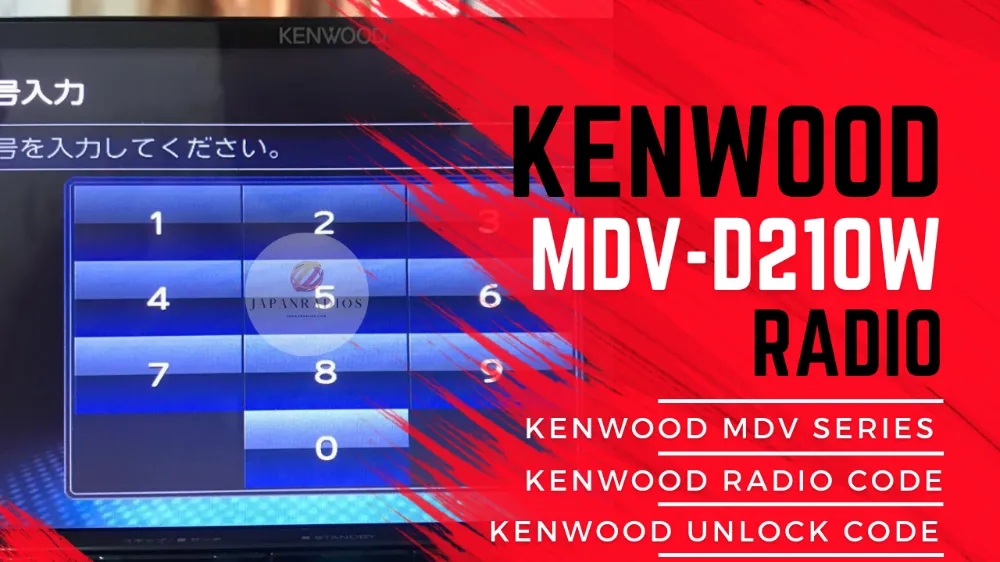
Get your genuine Kenwood MDV-210W radio code in minutes! Send a photo of your locked screen – we’ll guide you remotely. Permanent unlock with money-back guarantee. No removal needed.

Fast Delivery
🎯 Exact Model Support
🛠️ Compatibility Help
🔒 Secure Checkout

⚡ Quick Product Specifications

Product Format Instant Digital Code
Primary Fix Radio Unlock Code
Delivery Time Instant via Email (5-10m)
Compatibility Status Verified Fit Guarantee
Direct Answer

What is this product and how does it help?

This product provides a permanent Kenwood MDV-210W Radio Code | Unlock Instantly | With Money-Back Guarantee digital radio unlock code designed for Japanese import vehicles. It resolves the locked system error screen that appears after a battery reset or disconnection. The unlock code is generated using your radio's serial number and is delivered instantly via email. Once entered, it restores full access to the radio, CD player, Bluetooth pairing, and climate controls.

📦 What You Receive in Your Order

  • 1x Custom Radio Unlock Code: Generated specific to your unit serial.
  • 1x Step-by-Step Entry PDF Guide: Simple visual guide showing exactly how to enter the code.
  • 100% Unlock Guarantee: Full refund if the code does not unlock your unit.
  • Lifetime Customer Support: Access to our technical team via email and WhatsApp.

💬 Need Quick Compatibility Verification for Kenwood MDV-210W Radio Code?

Send a photo of your locked radio screen or Japanese error message to our 24/7 WhatsApp support. We will confirm the exact solution and processing time instantly before you order.

Get Instant Price for Unlock Code & SD Card →

How does the Kenwood MDV-210W Radio Code unlock service work?

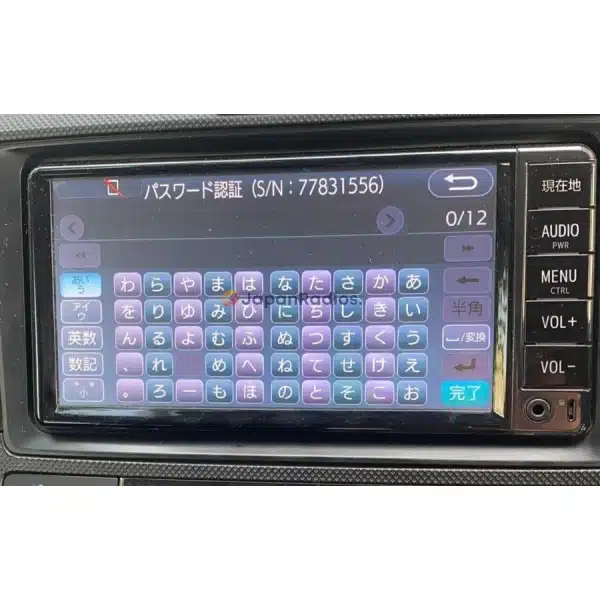
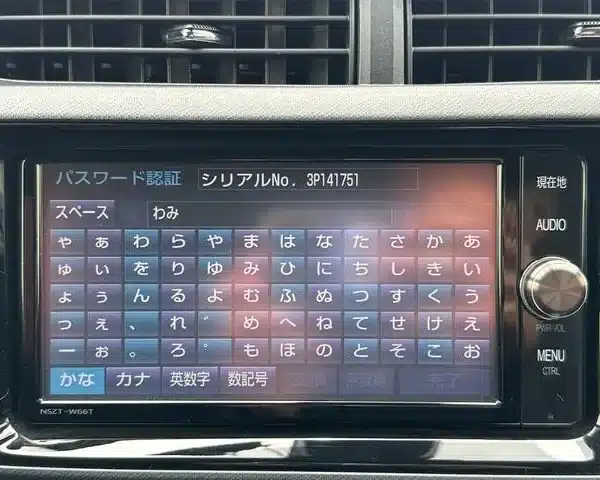
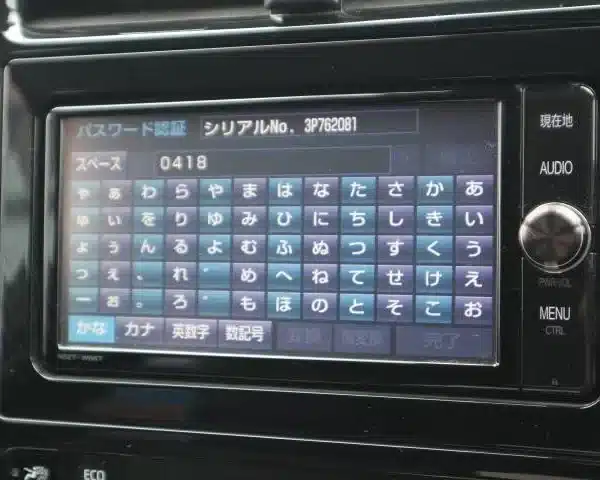
The Kenwood MDV-210W Radio Code calculates your factory anti-theft security PIN from your radio screen serial number or 16-character ERC code (resolving 暗証番号を入力してください and ダイアグ検査メニュー lock screens). Standard codes are delivered in 0–10 minutes via WhatsApp with a 100% Working Guarantee.

Kenwood MDV-210W Radio Code Recovery Status Grid

Infotainment System FunctionLocked Security StateUnlocked via JapanRadios
Touchscreen & System Setup❌ Locked PIN Prompt✅ Unlocked / Full Setup Menu
Bluetooth Phone & Audio❌ Blocked Connection✅ Restored (if available)
Reverse Camera & Steering Controls❌ Disabled Feed✅ Active (where equipped)

Unlock Your Kenwood MDV-210W Radio Code in Minutes

Lost your code? No removal required. We specialize in Kenwood MDV-210W radio codes – send us a photo of your locked screen, and we’ll deliver your permanent unlock code remotely.


How to Get Your Kenwood MDV-210W Radio Code

Take a clear picture showing:

  • “SECURITY” message on your Kenwood MDV-210W Locked Screen display

Our MDV-210W experts will:

  • Analyze your photo and confirm your Kenwood MDV-210W model
  • Help you extract your 8-digit serial number and 16-digit security code
  • Support you live until you get both codes

  • Genuine Kenwood MDV-210W radio code delivered via email in <5 minutes
  • Enter the code
  • Permanent unlock – never lock again

️ 100% Money-Back Guarantee

“If your Kenwood MDV-210W code doesn’t work, we refund instantly. No risk.”
– JapanRadios.com Promise


We Support ALL Kenwood MDV-210W and MDV-210 Variants


Why Choose JapanRadios.com for MDV-210W Codes?

Our Service
Dealerships/Other Services
📸 Photo-guided remote process
🔧 Require radio removal
⏱️ 5-minute MDV-210W code delivery
Days/weeks of waiting
🌐 MDV-210W specialist support
🤖 Generic radio service
💰 Affordable flat rate 
💰 $80-$200+ fees
🔓 Permanent MDV-210W unlock
🔓 Temporary fixes

Kenwood MDV-210W Radio Code FAQs

Q: How do I find my Kenwood MDV-210W serial number?
A: No need to remove the radio! Will guide you to get  the 8-digit serial and 16 digit Security code will appear on your MDV-210W display.

Q: Will this code permanently unlock my Kenwood MDV-210W?
A: Yes! Once entered, your MDV-210W will never lock again unless disconnected from power.

Q: What if my MDV-210W shows “SECURITY” but no codes?
A: Send us a photo anyway. Our MDV-210W specialists will guide you to reveal the hidden security code using button sequences.

Q: How fast will I get my Kenwood MDV-210W code?
A: 97% of MDV-210W codes are delivered in under 5 minutes.


Ready to Unlock Your Kenwood MDV-210W?

Get My MDV-210W Code Now 
Permanent unlock • 5-minute delivery • Money-back guarantee


Still Stuck? MDV-210W Experts Are Here 24/7

  • Live Chat: Instant help for your Kenwood MDV-210W

JDM Import Radio Recovery & Troubleshooting Guide

When Japanese import vehicles are battery-disconnected during shipping or maintenance, their factory head units reboot into Japanese security lockouts or SD error screens. Common error messages include 「プログラムを読み込むことができません 販売店へご相談下さい」, 「地図SDカードが音楽SDスロットに挿入されています」, 暗証番号を入力してください, and ダイアグ検査メニュー.

Frequently Asked Questions for Overseas JDM Owners

  • How fast will I get my radio unlock code? Standard unlock codes are delivered within 0–10 minutes via WhatsApp and Email (24/7 service). Rare complex models take 2–5 working days with instant status updates.
  • What delivery options are available for Map SD cards? We offer 0–60 minute Digital Download File Access for self-flashing onto a blank SD card (T&Cs apply) as well as Express Tracked Physical SD Card Dispatch (dispatched within 24 hours, 3–7 business days delivery worldwide).
  • What functions will be restored on my imported car radio? Our solutions restore default OEM touchscreen menus, AM/FM radio, CD/DVD, AUX, Bluetooth calling/streaming (if available), reversing and 360-degree cameras (where equipped), USB inputs, and steering wheel controls.
  • Do you offer Japanese to English conversion or CarPlay? Yes, we offer Japanese-to-English Menu Conversion and Apple CarPlay / Android Auto retrofit adapters (if supported for your model) for local overseas navigation.

JapanRadios provides a 100% Working Solution with Zero Failure Guarantee. If an unlock code or software card provided does not unlock a verified serial number (verified via photo or video of the screen error), a full 100% refund is issued immediately.

⚙️ How the Unlock Process Works

1

Identify Unit

Take a photo of your radio lock screen showing the serial or code entry screen.

2

Place Order

Place your order online and input your serial number during checkout.

3

Generation

We generate the factory unlock code and send it to your email in minutes.

4

Instant Fix

Enter the code on your screen to permanently restore and unlock your system.

⚠️
Important Notice & Terms

Please verify your radio model number matches exactly. Unlocks and firmware are generated specific to your unit's serial number. We do not provide physical returns for digital codes once generated, but we guarantee our solutions 100% when compatibility is verified before purchase.

❓ Frequently Asked Questions

Is this compatible with my Japanese unit? +
Yes, our codes are fully compatible with Japanese Domestic Market (JDM) radios of the specified model. We pull the code directly from the manufacturer database using your unique serial number.
What do I need before ordering? +
You only need to locate your radio serial number, which is usually displayed on the lock screen or can be found on a sticker on the top/side of the physical unit.
How is the unlock code delivered? +
The code is delivered instantly or within 10-15 minutes via the email address you provide at checkout. Full instructions are included.
What if the code doesn't work? +
We guarantee our codes 100%. If you verified your compatibility and the code fails, we will provide a full refund. Simply send us a short video of the code entry attempt.