
How to Change Language to English on Japanese Panasonic & Panasonic Strada Car Radios
設定 (Settings) → 言語 (Language). After checking hidden OEM menus and Subaru 2025+ dealer software options, JapanRadios converts 38+ verified models (CN-F1, CN-RA, CN-RE, CN-RS & Subaru CN-LR) to English remotely and fast across right-hand-drive import markets worldwide—with zero dashboard removal and factory cameras, steering-wheel controls, and premium audio kept intact.Panasonic Strada Language Change Compatibility Checker
Enter your bezel model code (e.g., CN-RE04WD, CN-RA05D, CN-F1X10D, CN-LR840DFD, or Subaru 2025+) for instant conversion eligibility, lock/SD prerequisites, and WhatsApp verification:
CN-RE04WD — Verified for Remote Custom English Firmware
CN-RE04WD (RE Series) has no native English menu toggle. JapanRadios assembles per-device custom English firmware remotely, keeping factory reversing cameras, steering-wheel controls, and premium audio intact.
Safety Notice: Each firmware is built strictly for your exact radio ID and cannot be shared with another unit.
All 38+ Verified Panasonic & Panasonic Strada Models for Remote English Conversion
Filter by Panasonic series or search your model number (e.g., CN-F1X10D, CN-RA05WD, CN-RE07D, CN-RS02WD, CN-LR840DFD), then click Check Model to test lock/SD readiness:
| Model Code | Series | OEM / Fitment | Factory Toggle | Remote Conversion | Compatibility & Fix |
|---|---|---|---|---|---|
| CN-F1X10D | F1 Flagship | Aftermarket Strada | No (Japanese-Only) | Remote Custom English Firmware | · Unlock Code |
| CN-F1X10BD | F1 Flagship | Aftermarket Strada | No (Japanese-Only) | Remote Custom English Firmware | · Unlock Code |
| CN-F1X10LD | F1 Flagship | Aftermarket Strada | No (Japanese-Only) | Remote Custom English Firmware | · Unlock Code |
| CN-F1X10BLD | F1 Flagship | Aftermarket Strada | No (Japanese-Only) | Remote Custom English Firmware | · Unlock Code |
| CN-F1XD | F1 Flagship | Aftermarket Strada | No (Japanese-Only) | Remote Custom English Firmware | · Unlock Code |
| CN-F1XVD | F1 Flagship | Aftermarket Strada | No (Japanese-Only) | Remote Custom English Firmware | · Unlock Code |
| CN-F1D | F1 Flagship | Aftermarket Strada | No (Japanese-Only) | Remote Custom English Firmware | · Unlock Code |
| CN-F1DVD | F1 Flagship | Aftermarket Strada | No (Japanese-Only) | Remote Custom English Firmware | · Unlock Code |
| CN-F1D9D | F1 Flagship | Aftermarket Strada | No (Japanese-Only) | Remote Custom English Firmware | · Unlock Code |
| CN-F1D9VD | F1 Flagship | Aftermarket Strada | No (Japanese-Only) | Remote Custom English Firmware | · Unlock Code |
| CN-RA03D | RA Series | Aftermarket / OEM Strada | No (Japanese-Only) | Remote Custom English Firmware | · Unlock Code |
| CN-RA03WD | RA Series | Aftermarket / Subaru OEM | No (Japanese-Only) | Remote Custom English Firmware | · Unlock Code · Map SD Fix |
| CN-RA04D | RA Series | Aftermarket / OEM Strada | No (Japanese-Only) | Remote Custom English Firmware | · Unlock Code |
| CN-RA04WD | RA Series | Aftermarket / OEM Strada | No (Japanese-Only) | Remote Custom English Firmware | · Unlock Code |
| CN-RA05D | RA Series | Suzuki / Subaru / Strada | No (Japanese-Only) | Remote Custom English Firmware | · Unlock Code · Map SD Fix |
| CN-RA05WD | RA Series | Suzuki / Subaru / Strada | No (Japanese-Only) | Remote Custom English Firmware | · Unlock Code · Map SD Fix |
| CN-RA06D | RA Series | Aftermarket / OEM Strada | No (Japanese-Only) | Remote Custom English Firmware | · Unlock Code |
| CN-RA06WD | RA Series | Aftermarket / OEM Strada | No (Japanese-Only) | Remote Custom English Firmware | · Unlock Code |
| CN-RA07D | RA Series | Aftermarket / OEM Strada | No (Japanese-Only) | Remote Custom English Firmware | · Unlock Code · Map SD Fix |
| CN-RA07WD | RA Series | Aftermarket / OEM Strada | No (Japanese-Only) | Remote Custom English Firmware | · Unlock Code · Map SD Fix |
| CN-RE03D | RE Series | Aftermarket / OEM Strada | No (Japanese-Only) | Remote Custom English Firmware | · Unlock Code |
| CN-RE03WD | RE Series | Aftermarket / OEM Strada | No (Japanese-Only) | Remote Custom English Firmware | · Unlock Code |
| CN-RE04D | RE Series | Aftermarket / OEM Strada | No (Japanese-Only) | Remote Custom English Firmware | · Unlock Code · Map SD Fix |
| CN-RE04WD | RE Series | Aftermarket / OEM Strada | No (Japanese-Only) | Remote Custom English Firmware | · Unlock Code · Map SD Fix |
| CN-RE05D | RE Series | Aftermarket / OEM Strada | No (Japanese-Only) | Remote Custom English Firmware | · Unlock Code |
| CN-RE05WD | RE Series | Aftermarket / OEM Strada | No (Japanese-Only) | Remote Custom English Firmware | · Unlock Code |
| CN-RE06D | RE Series | Aftermarket / OEM Strada | No (Japanese-Only) | Remote Custom English Firmware | · Unlock Code · Map SD Fix |
| CN-RE06WD | RE Series | Aftermarket / OEM Strada | No (Japanese-Only) | Remote Custom English Firmware | · Unlock Code · Map SD Fix |
| CN-RE07D | RE Series | Suzuki / Aftermarket Strada | No (Japanese-Only) | Remote Custom English Firmware | · Map SD Fix |
| CN-RE07WD | RE Series | Suzuki / Aftermarket Strada | No (Japanese-Only) | Remote Custom English Firmware | · Unlock Code · Map SD Fix |
| CN-RS01D | RS Series | Aftermarket / Subaru OEM | No (Japanese-Only) | Remote Custom English Firmware | · Unlock Code |
| CN-RS01WD | RS Series | Aftermarket / OEM Strada | No (Japanese-Only) | Remote Custom English Firmware | · Unlock Code |
| CN-RS02D | RS Series | Aftermarket / Subaru OEM | No (Japanese-Only) | Remote Custom English Firmware | · Unlock Code · Map SD Fix |
| CN-RS02WD | RS Series | Aftermarket / Subaru OEM | No (Japanese-Only) | Remote Custom English Firmware | · Unlock Code · Map SD Fix |
| CN-LR710DFA | Subaru CN-LR | Subaru OEM Panasonic | No (Japanese-Only) | Remote Custom English Firmware | · Unlock Code · Map SD Fix |
| CN-LR820D | Subaru CN-LR | Subaru OEM Panasonic | No (Japanese-Only) | Remote Custom English Firmware | · Unlock Code · Map SD Fix |
| CN-LR830DFA | Subaru CN-LR | Subaru OEM Panasonic | No (Japanese-Only) | Remote Custom English Firmware | · Unlock Code |
| CN-LR840DFD | Subaru CN-LR | Subaru OEM Panasonic | No (Japanese-Only) | Remote Custom English Firmware | · Unlock Code |
Why Your JDM Panasonic Radio Is Stuck in Japanese & How Each Option Compares
Most imported vehicles leave Japan with factory domestic-market stereos: menus, warnings, and voice alerts appear strictly in Japanese, satnav maps only cover Japan, and FM frequencies cap at 76–90 MHz.
1. Built-In Menu Check & Subaru 2025+
Check 設定 (Settings) → 言語 (Language) first—occasionally a deck carries a hidden English toggle. On newer Subaru 2025+ units, English can exist in hidden menus or via dealer software enabled remotely by JapanRadios while keeping cameras and steering controls.
2. JapanRadios Fast Remote English Firmware
For Japanese-only CN-F1, CN-RA, CN-RE, CN-RS & CN-LR stereos with zero native English option, we assemble per-device English firmware remotely without removing the dashboard—preserving your reversing camera, 360° view, steering keys, and OEM audio.
3. FM Band Expander (Audio Only)
If your only problem is FM reception above 90 MHz, a low-cost FM frequency converter tunes local stations—however menus, camera warnings, and satnav stay in Japanese, so combine with remote conversion or Bluetooth if you want readable menus.
4. Apple CarPlay / Android Auto Route
Because factory JDM GPS maps stay Japan-only, drivers use smartphone navigation via Apple CarPlay & Android Auto (supported models or retrofit) alongside our English menu conversion.
Real Panasonic Strada Before & After Conversion Proof (Japanese → English)
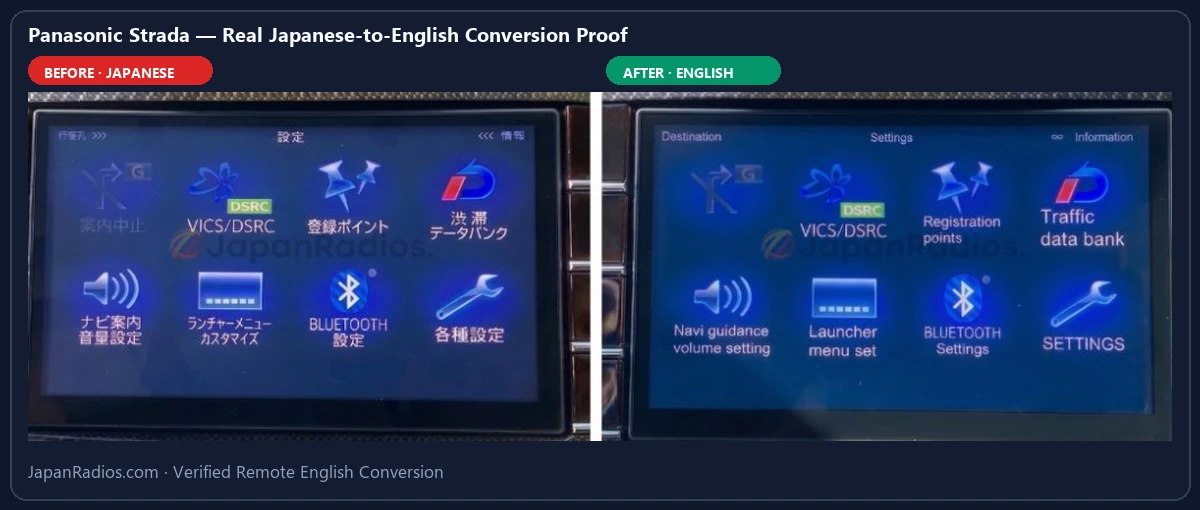
Japanese Panasonic Strada Menu Quick Reference
Seeing Japanese kanji right now? Match these 8 common Panasonic Strada screen labels before checking your model:
| Japanese Label | English Meaning | What To Do |
|---|---|---|
メニュー | Menu | Main home/function launcher screen |
設定 / 各種設定 | Settings | Check here first for any hidden language menu |
情報 | Information | Shows system version, SD status & unit details |
言語 | Language | Rare native toggle (mostly absent on JDM units) |
BLUETOOTH設定 | Bluetooth Settings | Phone pairing & hands-free audio controls |
ナビ案内音量設定 | Navi Guidance Volume | Voice & guidance volume settings |
地図SDカードを挿入してください | Insert Map SD Card | Clear missing/corrupt SD error before conversion |
パスワードを入力してください | Enter Password / PIN | Unlock security PIN before running English firmware |
Worldwide Remote Service for Right-Hand-Drive Japanese Imports
Rather not risk local hardware swaps or lose factory camera wiring? Our online engineers serve JDM vehicle owners remotely across the United Kingdom, New Zealand, Australia, Ireland, Cyprus, Malta, Singapore, Hong Kong, Malaysia, and Caribbean & Pacific RHD import markets (Free Model Check · Contact Us for Price).
Check Remote Coverage by Region (Europe, Oceania, Asia, Caribbean & Atlantic)
Europe & Mediterranean: United Kingdom, Ireland, Cyprus, Malta, Channel Islands (Guernsey & Jersey), Isle of Man.
Oceania & Pacific: New Zealand, Australia, Papua New Guinea, Samoa, Tonga, Solomon Islands, Kiribati, Nauru, Niue, Pitcairn Islands, Tuvalu.
Asia & Indian Ocean: Singapore, Hong Kong, Malaysia, Maldives, Mauritius, East Timor (Timor-Leste).
Caribbean, South America & Atlantic: Jamaica, Trinidad and Tobago, Bahamas, Barbados, Cayman Islands, Bermuda, Anguilla, Antigua and Barbuda, British Virgin Islands, Dominica, Grenada, Guyana, Montserrat, Saint Helena, Saint Kitts and Nevis, Saint Lucia, Saint Vincent and the Grenadines, Suriname, Turks and Caicos Islands, United States Virgin Islands, Falkland Islands.
Frequently Asked Questions: Panasonic Strada Japanese to English
Can I change a Japanese Panasonic Strada car radio language to English in the settings menu?
Most JDM Panasonic Strada units (CN-F1, CN-RA, CN-RE, CN-RS, and Subaru CN-LR series) have no English option in factory menus. Always check Settings (設定) -> System Settings -> Language (言語) first, and check Subaru 2025+ factory units for hidden or remote dealer-enabled English. For Japanese-only models, JapanRadios builds per-unit custom English firmware remotely across 44 approved RHD countries.
Which Panasonic Strada models support fast remote English conversion?
We support 38+ verified Panasonic Strada models including CN-F1X10D, CN-F1X10BD, CN-F1X10LD, CN-F1X10BLD, CN-F1XD, CN-F1XVD, CN-F1D, CN-F1DVD, CN-F1D9D, CN-F1D9VD; CN-RA03D/WD through CN-RA07D/WD; CN-RE03D/WD through CN-RE07D/WD; CN-RS01D/WD, CN-RS02D/WD; Subaru OEM CN-LR710DFA, CN-LR820D, CN-LR830DFA, CN-LR840DFD; plus newer Subaru 2025+ factory systems.
Why does each custom Panasonic English firmware only work on one unit?
Each custom English firmware package is assembled individually for one specific head unit serial/device ID. Using firmware built for another unit — even with the exact same model number — will fail verification and can brick or render the stereo inoperable.
Do I need to remove the Panasonic radio or ship it anywhere?
No. Our Panasonic Strada Japanese-to-English conversion is delivered remotely online across all 44 approved right-hand-drive countries, keeping your dashboard intact with zero shipping delays or local bench tear-downs.
Does remote English conversion keep my reversing camera, steering controls, and premium audio?
Yes. Converting your original Panasonic Strada unit preserves factory reversing cameras, 360-degree camera overlays, steering-wheel audio controls, and OEM amplifiers because your original Japanese hardware remains installed.
What happens to JDM GPS navigation maps and FM frequencies (76–90 MHz) after language change?
Factory JDM navigation maps remain locked to Japan, so owners use Apple CarPlay, Android Auto (where fitted), or a smartphone for overseas maps. For local FM stations above 90 MHz, an inexpensive FM band expander shifts local frequencies into the Japanese tuner range — though a band expander alone keeps menus in Japanese.
My Panasonic Strada shows a security password lock or Map SD error — what should I do first?
If your unit displays a security PIN prompt or Map SD card error (地図SDカードを挿入してください), clear the unlock code or bootable Map SD error first using our matching Panasonic Unlock Code or Map SD service before running language conversion.
What about newer Subaru 2025+ Panasonic / factory head units?
Select newer Subaru 2025+ factory displays either carry an English toggle inside dealer/service menus or support remote dealer software enablement via JapanRadios while retaining all OEM vehicle settings and cameras.
How is JapanRadios remote English conversion better than Google Translate camera or replacing the head unit?
Google Translate requires holding a phone up every time a warning appears, while replacing a factory stereo often risks losing OEM cameras, CANBUS vehicle menus, and steering-wheel controls. Remote conversion gives native permanent English menus directly on your original unit.
How quickly can JapanRadios check compatibility and start my Panasonic conversion?
Model compatibility checks via our Panasonic Language Change Checker or WhatsApp (send a screen and faceplate photo) are free and immediate, with fast remote delivery once your exact model and firmware status are confirmed.
Which countries do you support for remote Panasonic Strada English conversion?
We support all 44 approved right-hand-drive (RHD) markets worldwide including the UK, New Zealand, Australia, Ireland, Cyprus, Malta, Singapore, Hong Kong, Malaysia, Jamaica, Bahamas, Barbados, Trinidad and Tobago, Mauritius, Cayman Islands, Fiji/Pacific & Caribbean islands.
How much does Panasonic Strada Japanese-to-English conversion cost?
Compatibility checks are completely free. Because pricing varies by series (CN-F1, CN-RA, CN-RE, CN-RS, CN-LR, or Subaru 2025+ dealer software), click Contact Us for Price via WhatsApp with your bezel code and screen photo for an exact private quote.
Related Hubs: 19-Brand JDM Language Conversion Hub · Panasonic Radio Unlock Codes · Panasonic Map SD Fixes · JDM CarPlay & Android Auto · Verified Reviews · Contact Us