

Get Instant Price for Unlock Code & SD Card
Send us your radio model or a photo on WhatsApp. We reply with pricing and next steps in under 10 minutes.
Chat on WhatsAppGet Instant Price & Unlock Code
Get Instant Price for Unlock Code & SD Card
Send us your radio model or a photo on WhatsApp. We reply with pricing and next steps in under 10 minutes.
Chat on WhatsAppGet Instant Price & Unlock Code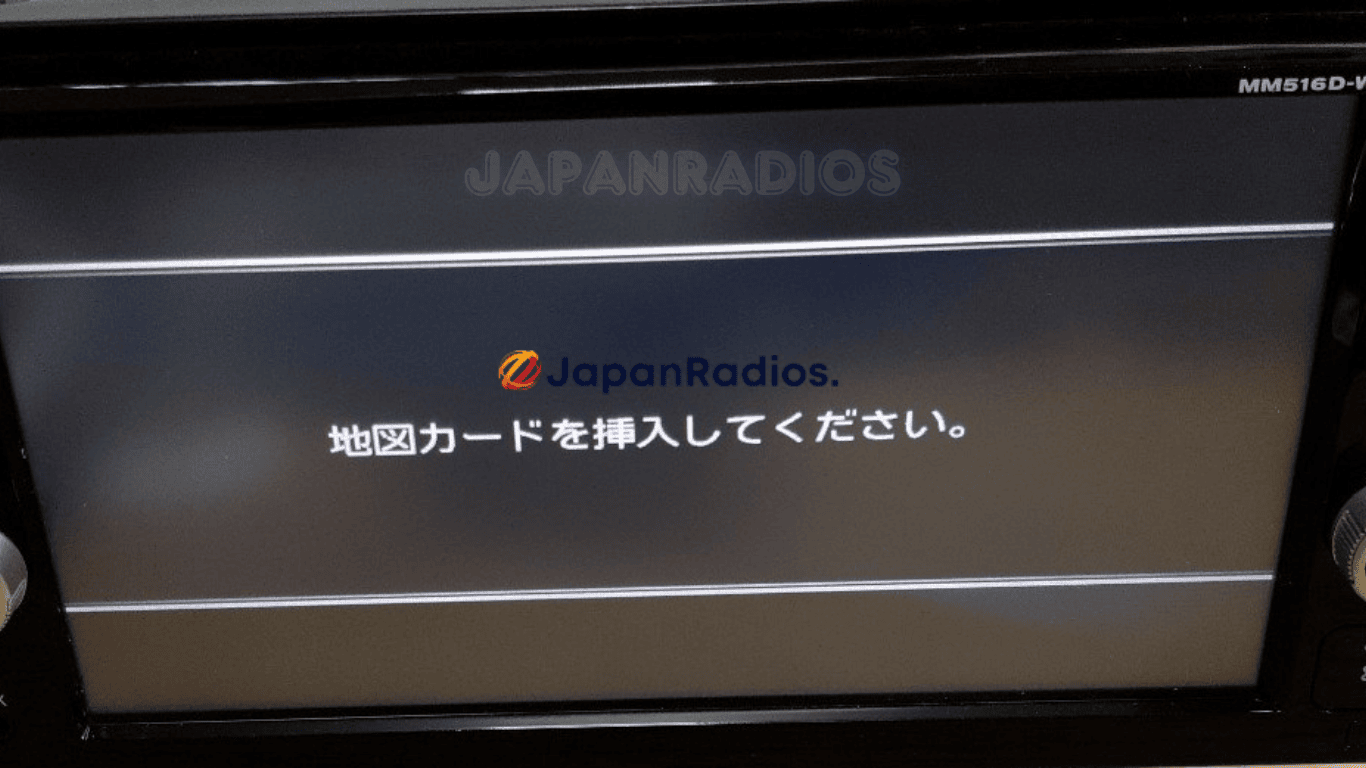

MM516D-W SD error fix – Apple CarPlay & Android Auto Activation for Nissan JDM Ultimate Fix
Get Instant Price for Unlock Code & SD Card
Send us your radio model or a photo on WhatsApp. We reply with pricing and next steps in under 10 minutes.
Chat on WhatsAppGet Instant Price & Unlock Code
MM516D-W SD error fix restores your Japanese-import Nissan’s Apple CarPlay and Android Auto features. Instantly resolve SD card errors with plug-and-play SD card.
⚡ Quick Product Specifications
Product Format
Physical SD Card / Files
Primary Fix
System Boot Recovery
Delivery Time
2-5 Days / Instant Download
Compatibility Status
Verified Fit Guarantee
What is this product and how does it help?
This product provides a replacement bootable Map SD Card or firmware download files for MM516D-W SD error fix – Apple CarPlay & Android Auto Activation for Nissan JDM Ultimate Fix. It resolves the 'Insert Map SD Card' or 'Unable to Read Data' error screen typical in JDM imported vehicles. The SD card is pre-loaded with the exact software files required by your vehicle's multimedia head unit. Inserting this card will automatically bypass the lock screen, reboot the system, and restore A/C climate controls, Bluetooth, and radio features.
📦 What You Receive in Your Order- 1x Pre-loaded high-speed Map SD Card (or fast download links if files chosen).
- 1x System Boot Recovery Firmware: Pre-flashed and model-matched files.
- 1x Step-by-Step Installation Notes: Simple guide to plug-and-play.
- Warranty Protection: Fully covered against data corruption.
- Lifetime Technical Support: Full assistance with system setup and conversion.
- 1x Pre-loaded high-speed Map SD Card (or fast download links if files chosen).
- 1x System Boot Recovery Firmware: Pre-flashed and model-matched files.
- 1x Step-by-Step Installation Notes: Simple guide to plug-and-play.
- Warranty Protection: Fully covered against data corruption.
- Lifetime Technical Support: Full assistance with system setup and conversion.
💬 Need Quick Compatibility Verification for MM516D-W SD error fix?
Send a photo of your locked radio screen or Japanese error message to our 24/7 WhatsApp support. We will confirm the exact solution and processing time instantly before you order.
Get Instant Price for Unlock Code & SD Card →How does the MM516D-W SD error fix unlock service work?
The MM516D-W SD error fix calculates your factory anti-theft security PIN from your radio screen serial number or 16-character ERC code (resolving 暗証番号を入力してください and ダイアグ検査メニュー lock screens). Standard codes are delivered in 0–10 minutes via WhatsApp with a 100% Working Guarantee.
MM516D-W SD error fix Recovery Status Grid
| Infotainment System Function | Locked Security State | Unlocked via JapanRadios |
|---|---|---|
| Touchscreen & System Setup | ❌ Locked PIN Prompt | ✅ Unlocked / Full Setup Menu |
| Bluetooth Phone & Audio | ❌ Blocked Connection | ✅ Restored (if available) |
| Reverse Camera & Steering Controls | ❌ Disabled Feed | ✅ Active (where equipped) |
MM516D-W SD error fix for Nissan (JDM import) – Apple CarPlay & Android Auto Ready
MM516D-W SD error fix is the fastest, proven plug-and-play solution for Japanese-import Nissan radios locked by “Please insert SD card” or “SD error” on MM516D-W head units.
Has your MM516D-W lost Apple CarPlay or Android Auto functions after SD card loss, export, or battery change? Our dedicated SD error fix card restores your radio instantly—no coding, no dealer trip, no risk. Designed for MM516D-W units in JDM models exported worldwide.
Key Features & Supported Functions
MM516D-W SD fix clears SD card error and instantly unlocks system functions
Restores Apple CarPlay & Android Auto usage on compatible units
Plug-and-play for MM516D-W head units in Japanese-import Nissans
Returns access to all standard multimedia/phone features, including:
Bluetooth® (music streaming & hands-free calls)
FM/AM radio
USB/SD/WALKMAN media playback (music, images, video)
AUX input and multimedia switching
Hands-free phone operation
CD/DVD playback (if equipped)
Quick install (no coding/programming), fast global shipping, expert support
MM516D-W SD error fix card – Restores Apple CarPlay and Android Auto on Nissan JDM import
Who It’s For
MM516D-W SD fix for any Japanese-import Nissan vehicle (not for sale/use in Japan)
Buyers craving restoration of Apple CarPlay, Android Auto, and Bluetooth functions after export or SD failure
How to Use
Turn off your vehicle and the MM516D-W head unit.
Insert the MM516D-W SD fix card into the appropriate SD slot.
Power on—error clears, and all smartphone/MFD integration features resume instantly.
What’s Included
MM516D-W SD error fix plug-and-play card
Quick install guide
Responsive support
Important:
MM516D-W SD error fix is made for Japanese-import/export Nissan vehicles. It removes SD error screens and re-activates Apple CarPlay, Android Auto, Bluetooth, radio, and media features. original JDM settings and radio bands remain unchanged.
Need another model? Browse our complete Map SD Card Unlocking & Diagnostic Hub or contact our 24/7 WhatsApp support to Get Instant Price for Unlock Code & SD Card →
JDM Import Radio Recovery & Troubleshooting Guide
When Japanese import vehicles are battery-disconnected during shipping or maintenance, their factory head units reboot into Japanese security lockouts or SD error screens. Common error messages include 「プログラムを読み込むことができません 販売店へご相談下さい」, 「地図SDカードが音楽SDスロットに挿入されています」, 暗証番号を入力してください, and ダイアグ検査メニュー.
Frequently Asked Questions for Overseas JDM Owners
- How fast will I get my radio unlock code? Standard unlock codes are delivered within 0–10 minutes via WhatsApp and Email (24/7 service). Rare complex models take 2–5 working days with instant status updates.
- What delivery options are available for Map SD cards? We offer 0–60 minute Digital Download File Access for self-flashing onto a blank SD card (T&Cs apply) as well as Express Tracked Physical SD Card Dispatch (dispatched within 24 hours, 3–7 business days delivery worldwide).
- What functions will be restored on my imported car radio? Our solutions restore default OEM touchscreen menus, AM/FM radio, CD/DVD, AUX, Bluetooth calling/streaming (if available), reversing and 360-degree cameras (where equipped), USB inputs, and steering wheel controls.
- Do you offer Japanese to English conversion or CarPlay? Yes, we offer Japanese-to-English Menu Conversion and Apple CarPlay / Android Auto retrofit adapters (if supported for your model) for local overseas navigation.
JapanRadios provides a 100% Working Solution with Zero Failure Guarantee. If an unlock code or software card provided does not unlock a verified serial number (verified via photo or video of the screen error), a full 100% refund is issued immediately.
⚙️ How the Unlock Process Works
Identify Unit
Locate the SD card slot on your unit (usually on front or behind screen).
Place Order
Select your exact car radio model number and complete checkout.
Generation
We configure the files. We ship the SD card or send instant download links.
Instant Fix
Insert the card, reboot the radio, and enjoy full functions in English.
Please verify your radio model number matches exactly. Unlocks and firmware are generated specific to your unit's serial number. We do not provide physical returns for digital codes once generated, but we guarantee our solutions 100% when compatibility is verified before purchase.
❓ Frequently Asked Questions
Is this compatible with my unit? +
Will this give me local maps or change the GPS? +
Can I choose between physical card shipping and download? +
What if I am unsure of my model? +
Related products
Genuine Panasonic CN-RZ83 SD Card Fix for Suzuki – Instant Radio Restore (99000-79BD0 / CN-RZ83ZA)
Get Instant Price for Unlock Code & SD Card
Send us your radio model or a photo on WhatsApp. We reply with pricing and next steps in under 10 minutes.
Chat on WhatsAppGet Instant Price & Unlock CodePanasonic CN-RS02WD Map SD Card Fix for Subaru – Restore Frozen Radio, Unlock Navigation & Audio System Fast
Get Instant Price for Unlock Code & SD Card
Send us your radio model or a photo on WhatsApp. We reply with pricing and next steps in under 10 minutes.
Chat on WhatsAppGet Instant Price & Unlock CodePowerful Panasonic CN-RE06D CN-RE06WD SD Card Fix for Japanese Import Radios
Get Instant Price for Unlock Code & SD Card
Send us your radio model or a photo on WhatsApp. We reply with pricing and next steps in under 10 minutes.
Chat on WhatsAppGet Instant Price & Unlock CodePowerful Panasonic CN-RE07D / CN-RE07WD SD Card Fix for Suzuki Radios
Get Instant Price for Unlock Code & SD Card
Send us your radio model or a photo on WhatsApp. We reply with pricing and next steps in under 10 minutes.
Chat on WhatsAppGet Instant Price & Unlock CodePremium Panasonic CN-LR820D SD Card Replacement & Error Fix Kit — Restore Full JDM Radio Functionality
Get Instant Price for Unlock Code & SD Card
Send us your radio model or a photo on WhatsApp. We reply with pricing and next steps in under 10 minutes.
Chat on WhatsAppGet Instant Price & Unlock CodeUltimate SD Card Fix for Panasonic CN-RE04D / CN-RE04WD Radios – Restore Your JDM System Fast!
Get Instant Price for Unlock Code & SD Card
Send us your radio model or a photo on WhatsApp. We reply with pricing and next steps in under 10 minutes.
Chat on WhatsAppGet Instant Price & Unlock Code