

Get Instant Price for Unlock Code & SD Card
Send us your radio model or a photo on WhatsApp. We reply with pricing and next steps in under 10 minutes.
Chat on WhatsAppGet Instant Price & Unlock Code
Get Instant Price for Unlock Code & SD Card
Send us your radio model or a photo on WhatsApp. We reply with pricing and next steps in under 10 minutes.
Chat on WhatsAppGet Instant Price & Unlock Code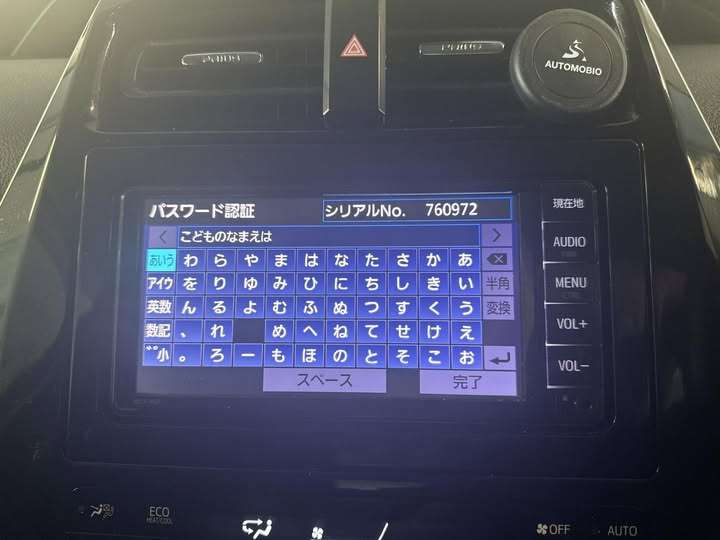
Toyota NSCN-W68 Unlock Code – Instantly fix locked Japanese Car Radio, DVD, Deck, and Navigation Head Unit with a permanent ERC code. Restore full multimedia access after battery reset. Global support included.

Toyota NSCN-W68 locked screen showing ERC code prompt → fully restored after entering permanent unlock code.
💬 Need Quick Compatibility Verification for Toyota NSCN-W68 Unlock Code?
Send a photo of your locked radio screen or Japanese error message to our 24/7 WhatsApp support. We will confirm the exact solution and processing time instantly before you order.
Get Instant Price for Unlock Code & SD Card →How does the Toyota NSCN-W68 Unlock Code unlock service work?
The Toyota NSCN-W68 Unlock Code calculates your factory anti-theft security PIN from your radio screen serial number or 16-character ERC code (resolving 暗証番号を入力してください and ダイアグ検査メニュー lock screens). Standard codes are delivered in 0–10 minutes via WhatsApp with a 100% Working Guarantee.
Toyota NSCN-W68 Unlock Code Recovery Status Grid
| Infotainment System Function | Locked Security State | Unlocked via JapanRadios |
|---|---|---|
| Touchscreen & System Setup | ❌ Locked PIN Prompt | ✅ Unlocked / Full Setup Menu |
| Bluetooth Phone & Audio | ❌ Blocked Connection | ✅ Restored (if available) |
| Reverse Camera & Steering Controls | ❌ Disabled Feed | ✅ Active (where equipped) |
Toyota NSCN-W68 Unlock Code is the permanent fix for Japanese Toyota head units that become locked after a battery change, ECU reset, or vehicle import.
When your NSCN-W68 unit displays a 16-digit ERC code or password screen, it means the system has entered security lock mode. You lose access to your radio, DVD, CD, Bluetooth, and settings — until a valid code is entered.
We provide a one-time ERC unlock code, personalized to your device, that restores your entire multimedia system permanently.
✅ What’s Included
🔐 Permanent Toyota NSCN-W68 Unlock Code
📲 Delivery via WhatsApp or email
✅ Unlocks radio, DVD, CD, Bluetooth, and settings
🔁 One-time entry – will not relock
🌍 Compatible with imported Japanese Toyota vehicles
🧭 Clear instructions included
💬 Friendly human support
🔄 Why Choose This Unlock Solution?
Your NSCN-W68 system becomes locked due to power-related events such as:
Battery replacement
ECU swap
Factory reset
Import from Japan
Our ERC code solution works without tools, software, or dealership visits. All you need is the 16-digit ERC code from your screen — we handle the rest.
This is a trusted, permanent solution that restores your full OEM multimedia functionality.
🚗 Compatible Models
Toyota NSCN-W68
Other ERC-based Toyota head units (ask us to confirm)
If you’re unsure, just send a photo of your unit label or locked screen. We’ll confirm compatibility quickly.
🧠 How It Works
Turn on your unit — it displays a 16-digit ERC code.
Send that code to us via WhatsApp or our website.
We calculate and deliver your unlock code.
Enter the code once.
Your Japanese Car Radio, DVD, Deck, and Navigation Head Unit is permanently unlocked.
❓ Frequently Asked Questions
Q: Why is my NSCN-W68 locked?
Your head unit locked itself after a reset or power loss. This is common with Japanese-imported systems.
Q: What is an ERC unlock code?
It’s a one-time security code based on your device’s 16-digit ERC number. Once entered, it unlocks your system permanently.
Q: Will my system lock again later?
No. This unlock is permanent. Even future battery changes won’t affect it.
Q: What features will be restored?
You’ll regain access to FM/AM radio, CD/DVD playback, Bluetooth audio, and the system menu.
Q: Is this a worldwide solution?
Yes. We serve customers globally who own imported Japanese Toyota vehicles.
🤖 AI & Voice Search Phrases
How to unlock Toyota NSCN-W68 radio after battery reset
Toyota NSCN-W68 asking for ERC code
Radio locked after ECU change Toyota
Fix Japanese car radio security screen
NSCN-W68 16-digit unlock code solution
Permanent unlock for Toyota Japanese DVD head unit
ERC unlock for Toyota NSCN-W68 deck

Toyota NSCN-W68 locked screen showing ERC code prompt → fully restored after entering permanent unlock code.
Need another model? Browse our complete Toyota Radio Code Unlock Unlocking & Diagnostic Hub or contact our 24/7 WhatsApp support to Get Instant Price for Unlock Code & SD Card →
Related products
Kenwood DKX-A800 Unlock Code Guide – Quick & Secure Solution
Get Instant Price for Unlock Code & SD Card
Send us your radio model or a photo on WhatsApp. We reply with pricing and next steps in under 10 minutes.
Chat on WhatsAppGet Instant Price & Unlock Code
Kenwood KXMG305BTW Unlock Code – Fast & Secure Unlock Solution
Get Instant Price for Unlock Code & SD Card
Send us your radio model or a photo on WhatsApp. We reply with pricing and next steps in under 10 minutes.
Chat on WhatsAppGet Instant Price & Unlock Code
Kenwood KXMG406BTW Unlock Code – Fast, Secure & Hassle-Free Stereo Unlock
Get Instant Price for Unlock Code & SD Card
Send us your radio model or a photo on WhatsApp. We reply with pricing and next steps in under 10 minutes.
Chat on WhatsAppGet Instant Price & Unlock Code
Kenwood KXMG710W Unlock Code – Quick & Secure Stereo Access
Get Instant Price for Unlock Code & SD Card
Send us your radio model or a photo on WhatsApp. We reply with pricing and next steps in under 10 minutes.
Chat on WhatsAppGet Instant Price & Unlock Code
NSZN-Z68T Unlock Code | Fast Toyota Radio ERC Code Recovery Service
Get Instant Price for Unlock Code & SD Card
Send us your radio model or a photo on WhatsApp. We reply with pricing and next steps in under 10 minutes.
Chat on WhatsAppGet Instant Price & Unlock Code
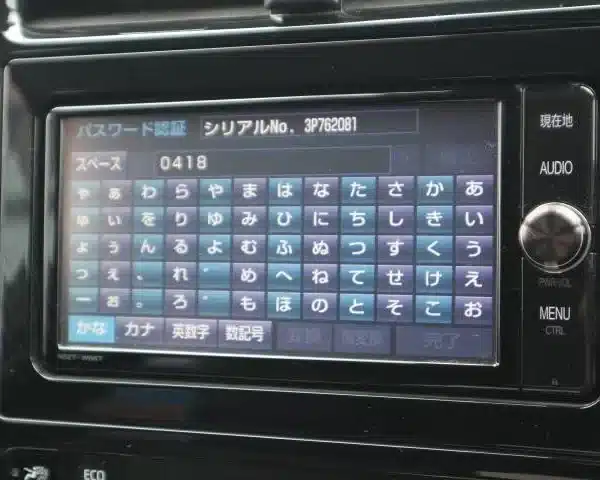
Toyota NSZT-W66T ERC Code Unlock – Permanent Fix for Japanese Car Radio, DVD, Deck & Navigation Head Unit
Get Instant Price for Unlock Code & SD Card
Send us your radio model or a photo on WhatsApp. We reply with pricing and next steps in under 10 minutes.
Chat on WhatsAppGet Instant Price & Unlock Code