
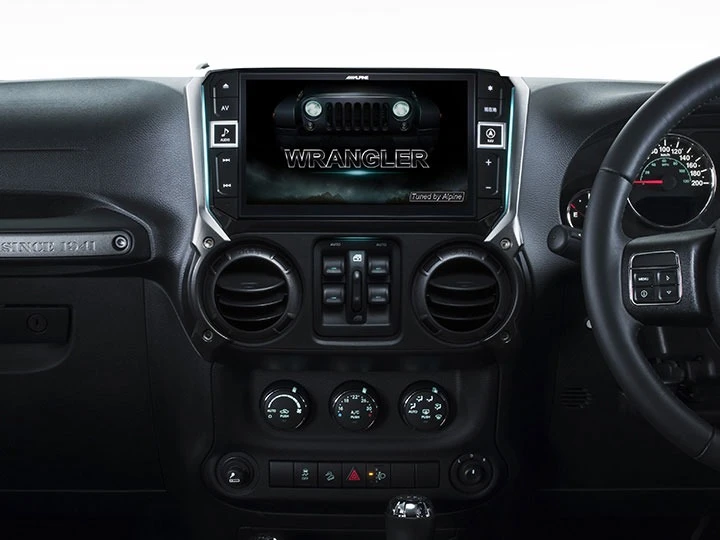
Direct Answer: Built for right-hand-drive JDM Jeep Wrangler Unlimited Sport (JK / JK36L) imports, the Alpine Big X Premium EX9Z-WRA and EX9Z-WRA-C2 (Sept 2017 multi-view rear camera bundle) feature a sharp 9-inch WXGA LCD (1280×720)—delivering 2.4× higher resolution than WVGA. If your Wrangler display locks after battery shipping disconnect, winch wiring, or battery replacement, send a clear photo of the locked screen on WhatsApp—we guide you right on the touchscreen to view your unit info with zero dashboard disassembly, confirm compatibility and full pricing before you pay, and provide your permanent unlock code within ~3 minutes once verified.
Alpine EX9Z-WRA vs. EX9Z-WRA-C2 Specs & Wrangler Kit Comparison

| Alpine Model Code | Release & Series | Display Specs | Camera & Regional Fitment |
|---|---|---|---|
| EX9Z-WRA | Sept 2017 (Z-Series) | 9" WXGA LCD (1280×720, 2.4× WVGA) | Main 9" Big X Premium unit & JK bezel kit for Wrangler Unlimited Sport (JK36L) |
| EX9Z-WRA-C2 | Sept 2017 (Z-Series) | 9" WXGA LCD (1280×720, 2.4× WVGA) | Exact EX9Z-WRA unit bundled with Multi-View HDR Rear Camera + Voice Touch |
| EX9V-WRA-C1 | Early 2017 (V-Series) | 9" WXGA Capacitive Big X | Earlier V-series head unit bundled with single-view rear camera for Wrangler JK |
| EX9V-WRA | 2016–2017 (V-Series) | 9" WXGA Capacitive Big X | Earlier V-series head unit & JK bezel kit without bundled camera |
| X409-WRA / i509-WRA | US / Export Restyle | 9" Alpine Restyle | Non-JDM export units — confirm screen badge first |
Compatible Jeep Wrangler JK Vehicles & Features Restored
| Vehicle Trim | Chassis & Years | Fitted Alpine Big X Kit |
|---|---|---|
| Jeep Wrangler Unlimited Sport (JK) | ABA-JK36L / JK38L (2011–2018) | EX9Z-WRA, EX9Z-WRA-C2, EX9V-WRA, EX9V-WRA-C1 |
| Jeep Wrangler 2-Door Sport (JK) | ABA-JK36S / JK38S | EX9Z-WRA / EX9Z-WRA-C2 / EX9V-WRA 9" JK Dash Kit |
| Jeep Wrangler Sahara / Rubicon (RHD JDM) | JK36L / JK38L Imports | Big X 9" Dedicated Fascia Kit |
Features Restored After Unlock: Clearing the anti-theft prompt restores the signature Wrangler boot tuning, 9-inch WXGA capacitive menu (2.4× WVGA clarity), multi-view rear camera angle switching (Panorama / Corner / Back-in), dynamic steering guidelines, Bluetooth audio/calling, HDMI input, and Voice Touch operation.
How to Unlock EX9Z-WRA & EX9Z-WRA-C2 Without Removing the JK Dashboard
Keep your Wrangler center bezel and power-window switch panel intact—no trim tools required:
- Power On to ACC & Photograph Screen: Turn ignition to ACC so the locked Japanese security prompt and lower/top Alpine bezel show clearly.
- Get Guided Touchscreen Info on WhatsApp: Send your photo to JapanRadios WhatsApp. We guide you right on-screen with no dash dismantling and confirm PIN-vs-SD eligibility plus full price before you pay.
- Receive Your Permanent Unlock Code: Once verified, receive your permanent factory security code typically within ~3 minutes.
- Enter & Confirm on Touchscreen: Tap digits carefully, press
決定(Confirm) /完了(Complete) /OK, and let the Big X reboot cleanly.
Lockout Prevention: Stop entering random four-digit guesses such as 1234—repeated failed tries trigger escalating Alpine security lockouts.
EX9Z-WRA & EX9Z-WRA-C2 Japanese Touchscreen & Side-Key Guide
| Japanese Text / Button | English Meaning | Function |
|---|---|---|
解除コードを入力してください | Please enter unlock code | Anti-theft code prompt active after battery loss |
パスワード / 暗証番号を入力してください | Enter password / PIN | Security code entry pad waiting for verified PIN |
決定 | Confirm / Enter | Submits your verified EX9Z-WRA / EX9Z-WRA-C2 unlock code |
完了 | Complete / Done | Finalizes unlock and restarts into Wrangler home menu |
訂正 / 削除 | Correct / Delete | Erases the last entered digit |
現在地 (Right Bezel Key) | Current Map Position | Physical navigation button on right bezel frame |
地図SDカードを挿入してください | Insert Map SD Card | Missing/corrupt Map SD (NOT a PIN — see diagnostic guide) |
See an SD card warning instead of a keypad? Read Alpine Password Lock vs. Missing Map SD Card →
Verified Alpine Unlock Video Tutorials (@japanradios)
Watch our real Alpine & NMZL security unlock walkthroughs (click any card to load the player).


Approved Right-Hand-Drive Support & Related Alpine Guides
Supported across our 44 approved right-hand-drive markets (New Zealand, Australia, UK, Ireland, Jamaica, Trinidad & Tobago, Barbados, Bahamas, Cyprus, Malta, Mauritius, Singapore, Malaysia, Hong Kong, etc.) plus B2B trade support for JDM Jeep importers. Related hubs: Alpine EX9V / EX9Z 9" Hub • Alpine Category Hub • All Alpine Models Guide • Error Dictionary.
Frequently Asked Questions
What is the difference between Alpine EX9Z-WRA and EX9Z-WRA-C2?
Both EX9Z-WRA and EX9Z-WRA-C2 (released September 2017) use the exact same 9-inch WXGA (1280×720, 2.4× higher resolution than WVGA) Big X Premium navigation unit for the Jeep Wrangler Unlimited Sport (JK / JK36L). EX9Z-WRA-C2 simply bundles Alpine’s multi-view HDR rear camera and Voice Touch package, while earlier EX9V-WRA and EX9V-WRA-C1 belong to the V-series generation. Every model unlocks via the exact same guided screen-photo flow.
Do I need to disassemble my Wrangler JK center dash or window switches?
No. Removing the JK center console and power-window switch bank is unnecessary—send a photo of the locked screen on WhatsApp and our technician guides you directly on the touchscreen to display the required unit info.
Will unlocking restore my multi-view rear camera, Voice Touch, and steering controls?
Yes. Entering your verified unlock code immediately restores multi-view backup camera angles with steering guidelines, Voice Touch, Bluetooth hands-free, HDMI, and steering-wheel audio switches.
Why do Wrangler JK36L imports lock EX9Z-WRA / EX9Z-WRA-C2 after a battery or winch install?
Disconnecting the battery for ocean shipping, AGM battery replacement, or auxiliary off-road lighting/winch wiring cuts constant 12V memory, activating Alpine’s anti-theft screen immediately on power-up.
How do I check if my EX9Z-WRA / EX9Z-WRA-C2 needs a PIN code vs. a Map SD Card?
Prompts reading 解除コードを入力してください, パスワード, or 暗証番号 require a PIN unlock. If the screen says 地図SDカードを挿入してください with no keypad, check our PIN vs. Map SD guide first before paying.