
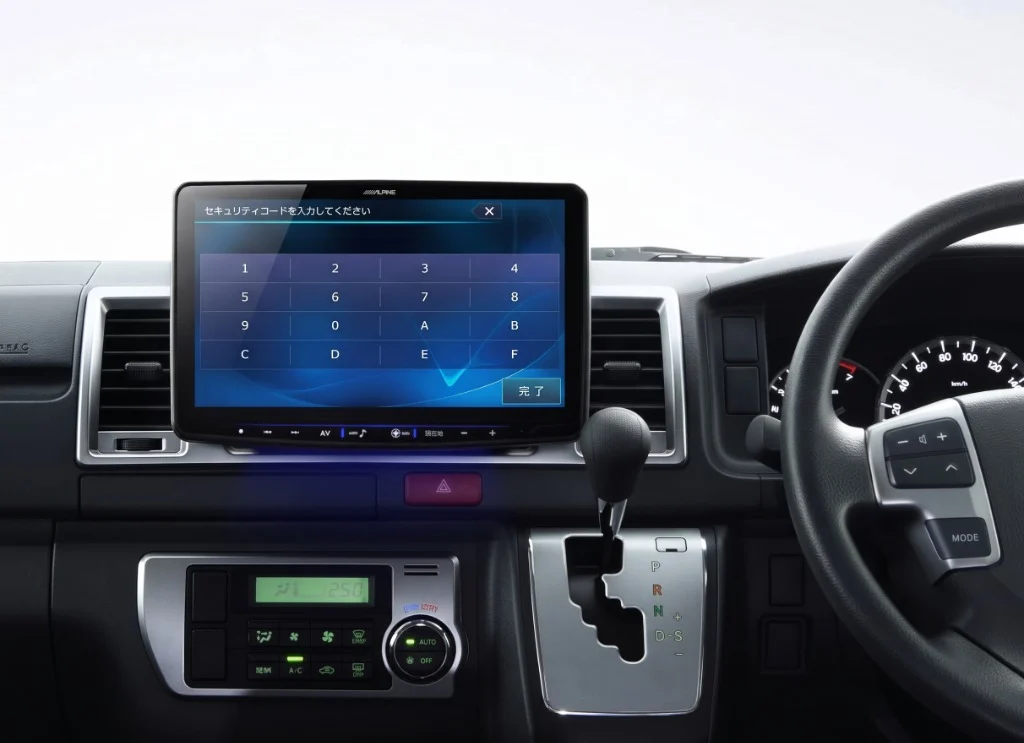
セキュリティコードを入力してください security lock, hexadecimal 0–9 / A–F keypad, bottom-right 完了 confirmation button, and illuminated lower bezel keys above the 200-series digital A/C panel and gated shifter.Direct Answer: The Alpine XF11Z-RE-SF3N-W is a Japan-domestic (JDM) 11-inch Floating BIG X 11 car navigation and multimedia package designed specifically for the 200-series Toyota RegiusAce and compatible 200-series Toyota HiAce models (December 2013 onward: TRH200, KDH201, GDH201, GDH206), featuring a dedicated over-dash floating display, a 4×4 full-seg digital TV tuner (four tuners & four antennas), and rear backup camera support. When a starter battery change or camper/dual-battery disconnect locks the unit on セキュリティコードを入力してください with a 0–9 and A–F keypad, send a clear photo of the locked screen on WhatsApp—our technician guides you directly on-screen with zero dashboard or floating-stand disassembly, confirms compatibility and full pricing before payment, and sends your permanent unlock code within ~3 minutes once verified.
Alpine XF11Z-RE-SF3N-W Specs & 200-Series HiAce/RegiusAce Comparison
| Alpine / OEM Model | Display & Mount | TV Tuner & Camera Support | 200-Series Vehicle & Unlock Notes |
|---|---|---|---|
| XF11Z-RE-SF3N-W | 11" Floating BIG X 11 (Dedicated Stand) | 4×4 Full-Seg TV (4 Tuners / 4 Antennas) + White Camera Package | 200-series Toyota RegiusAce & compatible HiAce (Dec 2013+ / Type 4+) |
| XF11Z-HI-SF3N-W / -B | 11" Floating BIG X 11 (Dedicated Stand) | HiAce-badged twin package (White -W or Black -B camera housing) | Identical 0–9 / A–F セキュリティコード guided screen-photo unlock |
| XF11NX-HI-NR / XF11NX2 | 11" Floating BIG X 11 (NX-Series) | Newer NX-generation floating 11" unit for 200-series HiAce/RegiusAce | Same zero-removal WhatsApp screen verification process |
| 007WV-B / NSZT-W66T | 7" Flush Alpine / Toyota Genuine OEM | Standard 200mm wide units fitted in HiAce & RegiusAce | Confirm bezel model & screen prompt first (distinct from Floating BIG X 11) |
Compatible 200-Series RegiusAce & HiAce Models + Features Restored
| Vehicle Series | Chassis & Years | Fitted Alpine BIG X 11 Kit |
|---|---|---|
| Toyota RegiusAce 200-Series (Super GL / DX) | TRH200 / KDH201 / GDH201 / GDH206 (Dec 2013+) | XF11Z-RE-SF3N-W Floating BIG X 11 Dedicated Package |
| Toyota HiAce 200-Series (Type 4 / 5 / 6 / 7) | TRH200V / KDH201V / GDH201V / GDH206V (Dec 2013+) | XF11Z-RE-SF3N-W / XF11Z-HI-SF3N-W 11" Floating Kit |
| HiAce / RegiusAce Camper & Fleet Imports | Standard & Wide Body (Dec 2013 Onward) | Dual-battery / inverter work frequently triggers anti-theft lock |
Features Restored After Unlock: Entering your verified code restores the 11-inch floating BIG X display mounted on its dedicated dashboard stand, rear backup camera reversing visibility & camera views, the 4×4 full-seg digital TV tuner (four tuners and four antennas for steady reception), Bluetooth hands-free calling & music streaming, steering-wheel audio/MODE buttons, and Voice Touch.
How to Unlock XF11Z-RE-SF3N-W Without Removing the 200-Series Dash
Keep the 200-series silver air-vent fascia and heavy floating dashboard stand intact—no trim tools needed:
- Power On to ACC & Photograph Screen: Turn ignition to ACC so the live
セキュリティコードを入力してくださいprompt and0–9/A–Fkeypad show clearly. - Get Guided Touchscreen Info on WhatsApp: Send the photo to JapanRadios WhatsApp. We guide you directly on-screen with zero dash removal and confirm compatibility plus exact pricing before payment.
- Receive Your Permanent Alphanumeric Code: Once verified, receive your permanent
0–9/A–Funlock code typically within ~3 minutes. - Enter & Tap Complete (
完了): Tap each character cleanly (use top-right×to backspace), press bottom-right完了, and let the BIG X 11 reboot cleanly.
Lockout Prevention: Never guess 0000, 1234, or random hex sequences—repeated failed tries lock out Alpine BIG X 11 entry.
XF11Z-RE-SF3N-W Locked Screen, Hex Keypad & Lower Key Guide
| Japanese Text / Key | English Meaning | Function |
|---|---|---|
セキュリティコードを入力してください | Please enter the security code | Active Alpine Floating BIG X 11 anti-theft lock after 12V disconnect |
0–9 & A–F Keys | Hexadecimal keypad | Enters digits and letters A–F from your verified XF11Z-RE-SF3N-W code |
× (Top-Right) | Clear / Backspace | Erases the last entered character on the security bar |
完了 (Bottom-Right) | Complete / Confirm | Submits your verified code and reboots into normal RegiusAce/HiAce operation |
AV / 現在地 (Lower Bezel) | Audio-Video / Current Map | Illuminated lower touch buttons above the hazard switch for menu navigation |
地図SDカードを挿入してください | Insert Map SD Card | Missing or corrupt Map SD (NOT a security PIN — check diagnostic guide) |
Seeing a Map SD prompt instead of the keypad? Read Alpine Password Lock vs. Missing Map SD Card →
Verified Alpine Unlock Video Tutorials (@japanradios)
Watch our real Alpine & NMZL security unlock walkthroughs (click any card to load the player).


Approved Right-Hand-Drive Support & Related Alpine Guides
Supported across our 44 approved right-hand-drive markets (New Zealand, Australia, UK, Ireland, Jamaica, Trinidad & Tobago, Barbados, Bahamas, Cyprus, Malta, Mauritius, Singapore, Malaysia, Hong Kong, etc.) plus B2B wholesale pricing for commercial van dealers & campervan converters. Related hubs: Alpine XF11Z / XF11NX 11" Hub • Alpine Category Hub • All Alpine Models Guide • Toyota HiAce 007WV & Harrier Guide • Error Dictionary.
Frequently Asked Questions
What do the RE, SF3N, and W suffixes mean on Alpine XF11Z-RE-SF3N-W?
RE designates the 200-series Toyota RegiusAce fitment kit (also shared across compatible 200-series HiAce models from December 2013 onward), SF3N indicates Alpine’s multi-camera/safety bundle configuration, and W denotes the pearl-white camera finish.
Does the XF11Z-RE-SF3N-W unlock work the same on both Toyota RegiusAce and HiAce 200-series (Dec 2013+)?
Yes. RegiusAce and HiAce 200-series vans (TRH200, KDH201, GDH201, GDH206 from Type 4 / Dec 2013+) use the same Floating BIG X 11 hardware and セキュリティコードを入力してください screen, so both unlock via the identical guided screen-photo flow.
Do I need to unmount the 11-inch floating stand or pull the 200-series dash fascia?
No. Pulling the silver 200-series A/C vent surround or unbolting the heavy floating dashboard stand behind the 11-inch screen is unnecessary—send a photo of your locked screen on WhatsApp and our technician guides you directly on-screen.
Will unlocking restore my backup camera visibility, steering MODE controls, and 4×4 full-seg TV tuner?
Yes. Entering your verified code unlocks full Floating BIG X 11 operation immediately, restoring rear backup camera views when reversing, steering-wheel audio/MODE switches, 4×4 full-seg digital TV tuner (4 tuners / 4 antennas), Bluetooth, and media playback.
Why did my HiAce / RegiusAce lock the XF11Z-RE-SF3N-W after a dual-battery or campervan wiring install?
Commercial fleet battery swaps, campervan split-charge/inverter installations, blown fuses, or ocean shipping battery disconnects interrupt constant 12V memory and trigger the Alpine security prompt right away.