
Alpine Radio Code Unlock
Alpine radio code unlock recovers your Alpine radio security code from its serial number, restoring audio, camera, and navigation in 5–15 minutes.
How do you unlock an Alpine radio code?
We calculate it from the serial number printed on your unit’s label or lock screen. Send the serial (or a clear photo of the locked screen) to our 24/7 WhatsApp support and receive the genuine Alpine radio security code in 5–15 minutes, backed by a 100% money-back working-code guarantee.
Which Alpine models are supported?
All JDM Alpine Big X, VIE, Z/V, and NX-series navigation units from 2007–2025 are covered. The 60+ unit index above lists every supported model, and unlisted units are verified on request from a serial number photo.
How long does Alpine code delivery take?
Delivery takes 5–15 minutes, 24/7, including weekends and holidays. Every order is processed digitally from your serial number with an instant full refund if the code does not work.
Per Alpine’s official owner documentation: an Alpine head unit’s security code protection engages whenever unit power is interrupted — such as a battery disconnection or replacement — and full operation resumes only after the original Alpine radio security code is re-entered.
— Source: Alpine Electronics owner’s manual documentation
How do you unlock a locked Alpine radio without a code?
You unlock it by entering the original security code — or a permanent code generated from the unit’s serial number. Most locked Alpine units are recovered in two steps: check for the factory code sticker first, then request a code from the serial number if none is found.
Step 1: Check for the original Alpine radio security code
The original code is usually on a small card or sticker supplied with the vehicle — no disassembly needed. Check two places:
- Glovebox: inside of the glovebox door or the top panel.
- Owner’s Manual: a handwritten code on the inside cover or a stapled slip of paper.
If you find a 4–16 digit code, enter it using the preset buttons or the touchscreen keypad. If the screen unlocks, you are done.
Step 2: Retrieve the radio’s serial number
The serial number is what a permanent unlock code is generated from. If you can’t find the original code, this number is the only requirement.
Step 3: Generate the permanent unlock code
A permanent Alpine radio security code is generated from your serial number by dedicated support — no dealer visit required. Send a message to the 24/7 WhatsApp support line — Click to chat with the JapanRadios support team via WhatsApp (average response under 60 seconds).
After receiving your code, enter it using the on-screen keypad or preset buttons — the system boots straight into its normal interface, confirming the unlock.
Showing 1–18 of 65 results
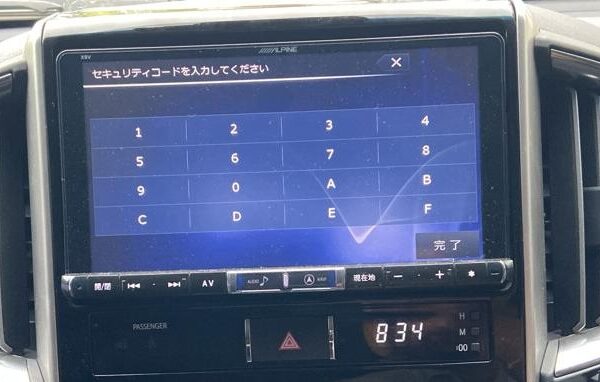
Alpine Radio Code Unlock Car Navigation & Infotainment Recovery Support
Struggling with missing map SD card warnings,暗証番号を入力してください security PIN prompts, or reboot loops in your Japanese import vehicle? JapanRadios supplies official ERC security code unlock services, bootable SD cards, and Japanese-to-English menu conversions across 54 target import markets. Restores default OEM touchscreen setup menus, Bluetooth calling (if available), reversing camera grid lines (if equipped), AM/FM audio, and Apple CarPlay / Android Auto retrofits (if supported). Contact our expert team via WhatsApp — Chat with the JapanRadios support team now for an instant 0–10 min fix.